 for Jira
One click from issue to timer
Start, stop or switch the timer right on the issue, with phase and activity, or log time after the fact.
Start the clock from the issue you are working on and stop it to create a real time entry in Rundown. Install Rundown for Jira, our native app, once for the whole site, or add the browser extension just for yourself.
A native Jira Cloud app from the Atlassian Marketplace. A Jira admin installs it once and every teammate finds the Rundown panel on every issue, in Jira’s own interface. Nothing to install per person, no browser extension to roll out.
Start, stop or switch the timer right on the issue, with phase and activity, or log time after the fact.
Planned against logged time and the project’s budget burn, where the work happens, for people with budget access.
A My time page with today and this week, every entry editable, and a dashboard gadget with time per project.
A Jira admin installs it once and every teammate has it. Nothing to roll out per person.
Developers love a one-click timer, so we put one on every Jira issue. The Rundown Tracker extension adds a start/stop button straight into the issue view and the browser toolbar. No context switching, no forgotten hours.
Works in Chrome, Edge and Brave. Sign in once and track from any Jira issue.
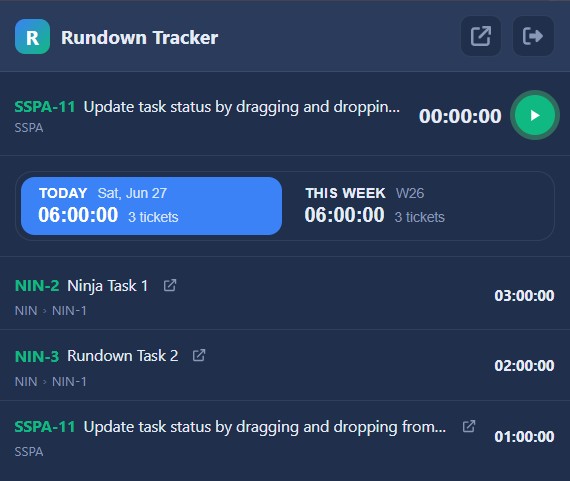
The Chrome extension is a per-person install, for when you want the timer before your Jira admin installs the app. It needs a Rundown workspace connected to your Jira Cloud site.
Install Rundown Tracker from the Chrome Web Store. It works in Chrome, Edge and Brave.
Open the extension and sign in with your Rundown account. It stays signed in from then on.
Open an issue and click start. Stop the clock when you are done and the hours land in Rundown.
Install the Jira app for your site, or add the extension and start tracking on your next Jira issue. New to Rundown? Start free for 60 days, no credit card required.